
Setting Up Rewards & Perks
The Mellow Market allows team members to exchange earned mangos/points for meaningful company perks and rewards.
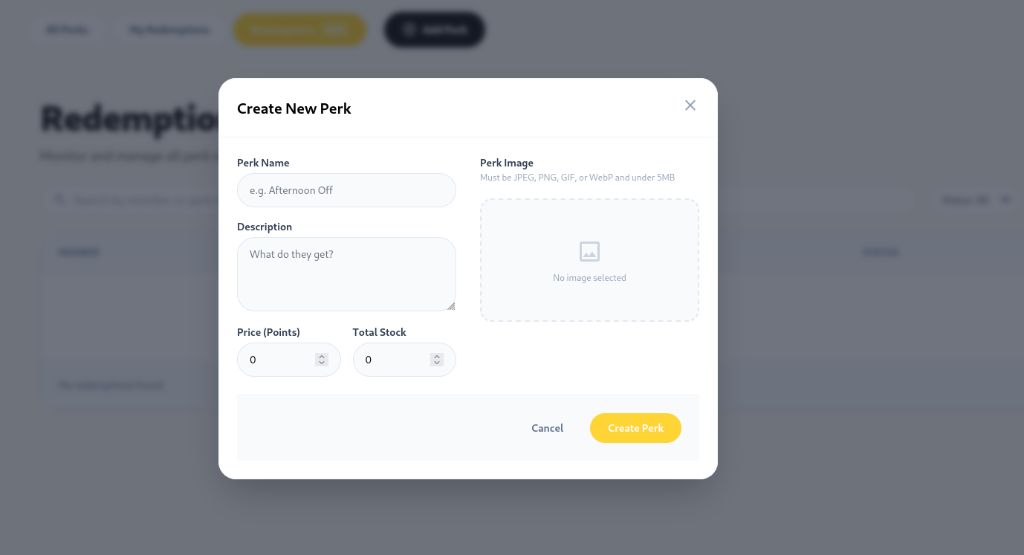
Adding a Reward to Mellow Market
Section titled “Adding a Reward to Mellow Market”- Log into the Mellowe Admin Dashboard and navigate to Market.
- Click + Add Perk.
- In the Create New Perk modal, configure the perk details:
- Perk Name: Enter the title (e.g. Afternoon Off, Prime Desk Location, $25 Starbucks Gift Card).
- Description: Clear instructions on what the reward includes and fulfillment instructions.
- Price (Points): Set the cost in mangos/points required to redeem.
- Total Stock: Set the total inventory quantity available.
- Perk Image: Upload a preview image (JPEG, PNG, GIF, or WebP under 5MB).
- Click Create Perk.
Managing Inventory & Stock
Section titled “Managing Inventory & Stock”When total stock for a perk reaches 0, Mellowe automatically marks the item as out of stock in Mellow Market so users cannot redeem it until an admin increases the stock level.