
Setting Up Fulfillment Admin
Assigning the Market Fulfillment role allows specific team members (such as HR managers, office managers, or team leads) to manage Mellow Market perks and approve member reward redemptions without granting them full platform admin access.
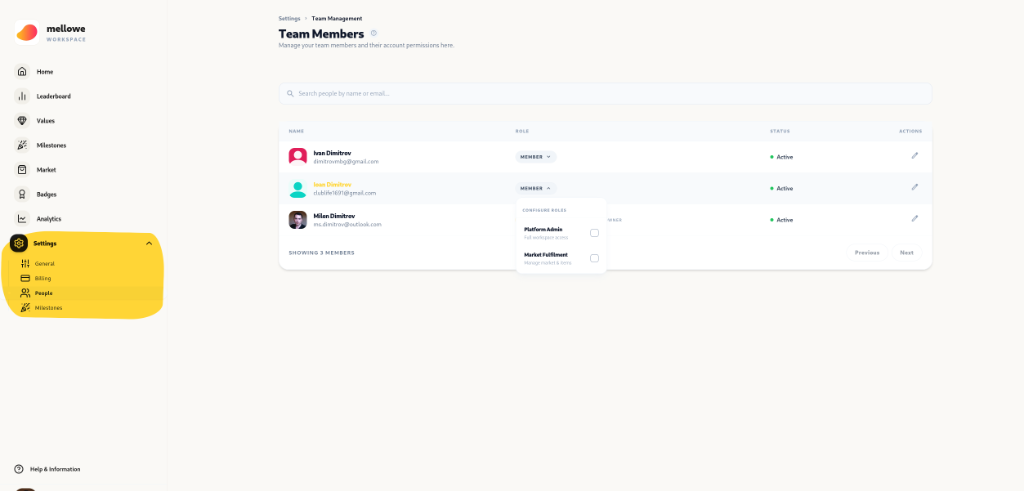
How to Grant Market Fulfillment Role
Section titled “How to Grant Market Fulfillment Role”- Log into the Mellowe Dashboard as a Platform Admin.
- Navigate to Settings > People (Team Management).
- Find the team member in the Team Members list.
- Click the edit icon (
✏️) or role dropdown under ROLE. - In the Configure Roles popover, check Market Fulfillment:
- Platform Admin: Full workspace access
- Market Fulfillment: Manage market & items
- Save changes.
What Can a Market Fulfillment Admin Do?
Section titled “What Can a Market Fulfillment Admin Do?”Once assigned the Market Fulfillment role, the team member can:
- Add & Edit Perks: Click + Add Perk in Mellow Market to publish company rewards.
- Manage Stock & Pricing: Update stock quantities, point costs, and perk descriptions.
- Fulfill Redemptions: Access Market > Redemptions (ADMIN) to review member reward claims and mark them as Fulfilled.