
Setting Up Celebrations
Mellowe automates personalized birthday and work anniversary celebration posts to bring your team together and ensure no one’s special day goes unnoticed.
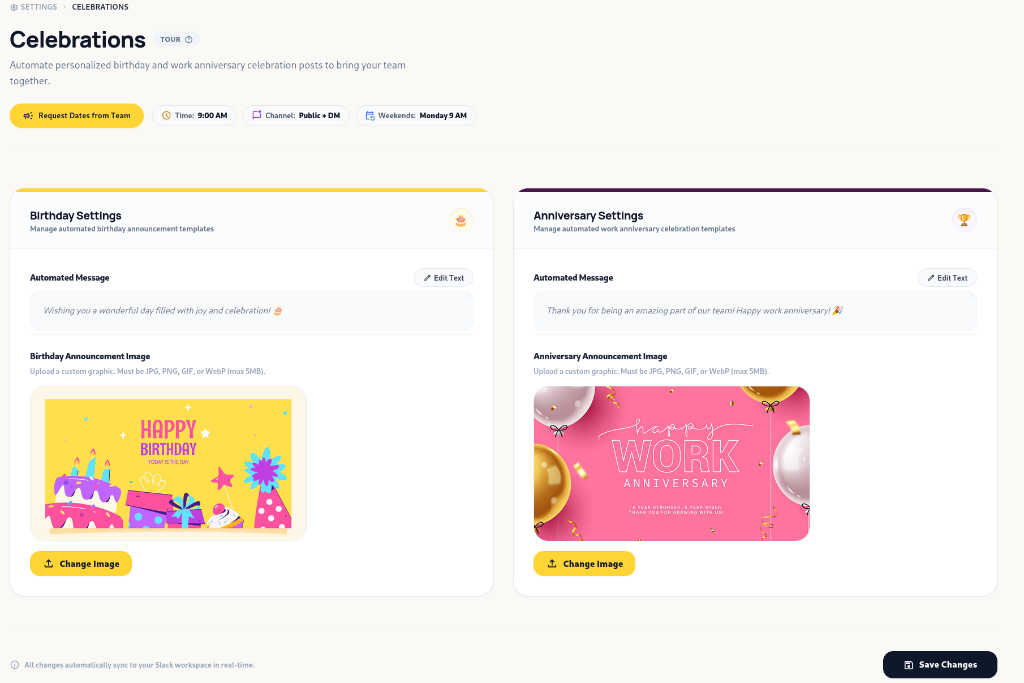
Requesting Dates from Your Team
Section titled “Requesting Dates from Your Team”Admins can prompt the team to add their dates directly from the dashboard:
- Navigate to Settings > Celebrations.
- Click Request Dates from Team in the top header.
- Mellowe will send a direct Slack prompt to team members with an interactive modal button allowing them to submit their birthday and work anniversary dates in one click.
Celebration Delivery & Scheduling Rules
Section titled “Celebration Delivery & Scheduling Rules”- Delivery Time: All automated celebration posts are sent at 9:00 AM.
- Dual Notification: Celebrations post simultaneously in the designated Public Main Channel (e.g.
#mellow-out) AND send a personal congratulatory Direct Message (DM) to the celebrating team member. - Weekend Rollover Rule: If a birthday or work anniversary falls on a Saturday or Sunday, Mellowe automatically defers the announcement and sends both the public channel post and the personal DM on Monday at 9:00 AM.
Configuring Celebration Templates (Admin Guide)
Section titled “Configuring Celebration Templates (Admin Guide)”Workspace Admins can customize the announcement text and visual graphics for both birthdays and work anniversaries in Settings > Celebrations.
1. Birthday Settings
Section titled “1. Birthday Settings”- Automated Message: Customize the greeting message (e.g., “Wishing you a wonderful day filled with joy and celebration! 🎂”).
- Birthday Announcement Image: Upload a custom graphic banner (JPEG, PNG, GIF, or WebP under 5MB). Click Change Image to select your file.
2. Anniversary Settings
Section titled “2. Anniversary Settings”- Automated Message: Customize the work anniversary greeting (e.g., “Thank you for being an amazing part of our team! Happy work anniversary! 🎉”).
- Anniversary Announcement Image: Upload a custom graphic banner celebrating team tenure. Click Change Image to select your file.
Real-Time Synchronization
Section titled “Real-Time Synchronization”All template and graphic updates saved in Settings > Celebrations sync automatically to your Slack workspace in real-time.